
The Updated UI

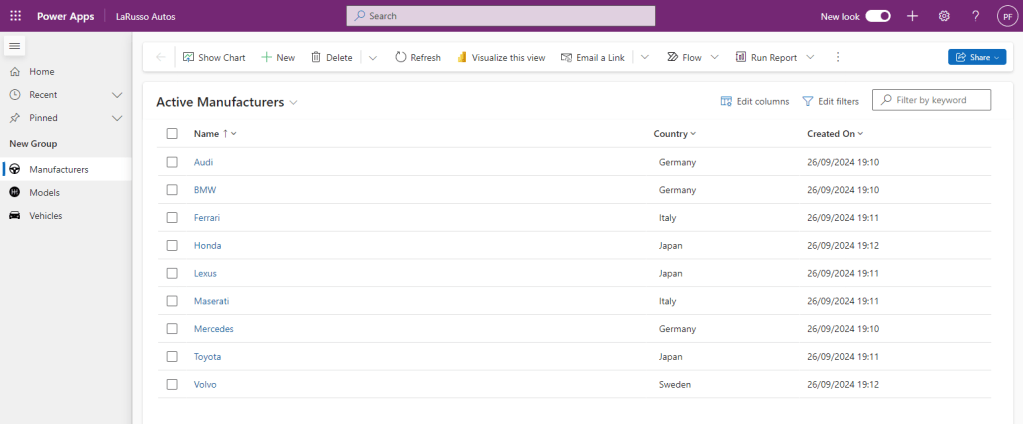
So we’ve changed all our table icons, but how is this reflected in our model-driven app? The first observable change is our side navigation bar – gone are the default icons, replaced by our shiny new ones.
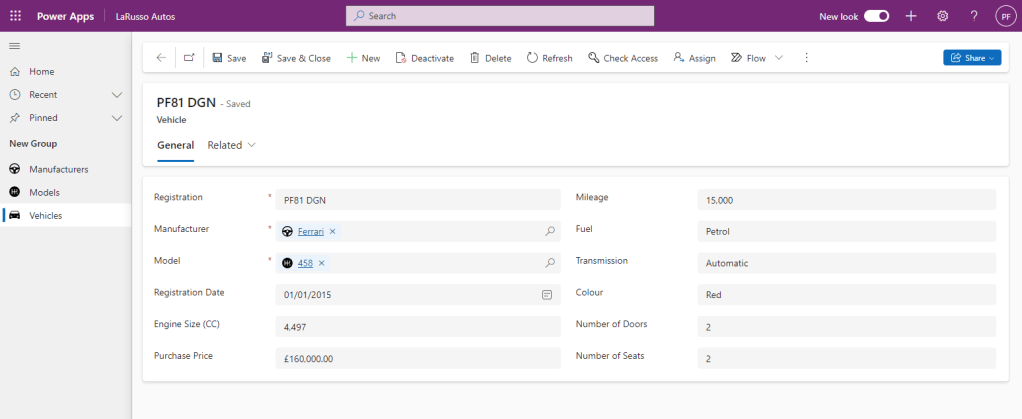
Furthermore, any reference to our tables in lookup fields will display our new icons – observe the Manufacturer and Model fields in our Vehicle form.
Such a simple change, but one that provides a better experience for your end users.

Pages: 1 2 3

2 responses to “Enhancing UI with SVG Icons in Model-Driven Apps”

  1. Power Automate, Power Apps and Microsoft Forms – Power Platform Pete Avatar

    […] for our Survey Response table – if you would like a recap on this, take a look here, here and here! I’ve added a new page for Survey responses to the Dojo Membership app – all submitted […]

    Like

    1. Veo 3 Avatar

      Thank you so much for your wonderful and insightful share! Every word is packed with valuable thoughts and practical tips that truly broaden my horizons.

      Like

Leave a comment

Why are you reporting this comment?

Report type