
In this lesson, we will cover:
- Working with Solutions
- Creating Publishers – How and Why
- Creating Dataverse Tables
- Primary column vs. Primary key
- Display name vs. Schema name
- Default columns created by Dataverse and their use
- Adding new columns
- Restricting column values to a predefined list of choices
- Creating relationships between tables
Let’s recap on the data model we want to build:

Whether you are working in a shared environment with other developers, or your own personal development environment – always always always create your work inside a solution.
Select Solutions from the side navigation, then click + New solution in the top navigation bar. This will open a dialog at the side of the screen like this:
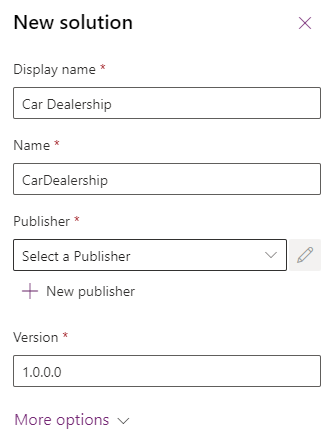
Fill in the values you like. By default, the value of Name is the same as Display name, but with spaces and special characters removed. For the Publisher, click on the + New publisher button to open the following dialog:
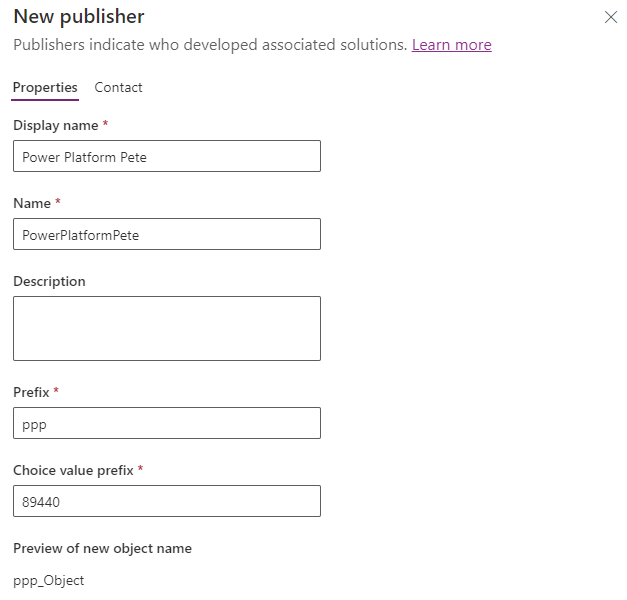
Fill in the required details as you like. You can leave Choice value prefix to whatever default value is suggested. If there are multiple publishers in your development environment, be sure to select a value for Prefix that is different from the others. We’ll talk about the importance of this field shortly.
Click Save at the bottom of the New publisher dialog. On successful save, the New solution dialog is shown again, and we can select our new publisher from the dialog.
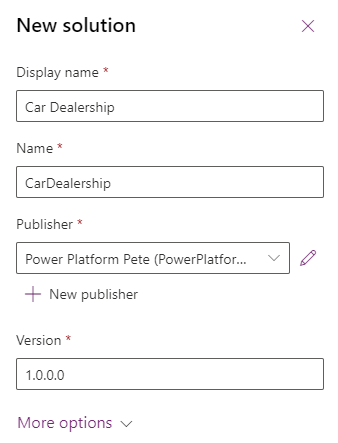
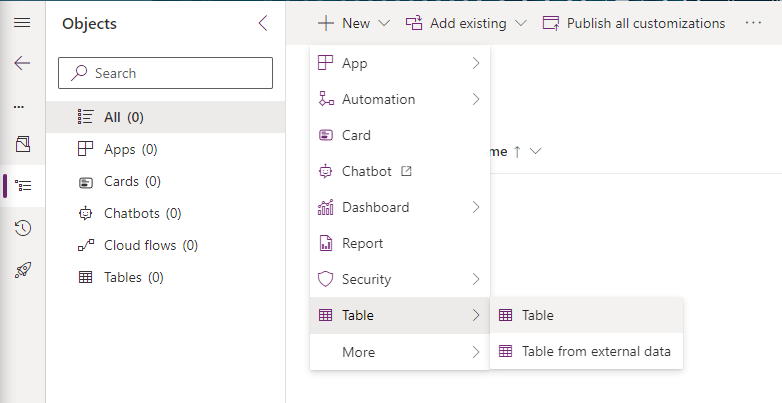
Click the Create bottom at the bottom of the dialog to create our new blank solution. this will take us to the following screen:

From the top navigation, click + New -> Table -> Table and let’s get started with our first table – Manufacturer.

 Power Platform Pete
Leave a reply to Bulk Importing Data using Dataflows Part 2: Multiple Tables – The Plan – Power Platform Pete Cancel reply