
Finally, we come to mobile development. There’s a few things to consider here. Model-driven apps incorporate responsive design as standard, meaning they can be used on mobile or tablet device. If that’s the case, why consider canvas?

Canvas apps can access your device hardware, whereas model-driven apps cannot. This allows us to build apps that use your mobile/tablet camera and/or microphone. Maybe you want to create a barcode reader application? Canvas app. Maybe you want to build an app to take audio notes (and use Azure services to transcribe the audio)? Canvas app. Maybe an app to measure distances in the room around you? Canvas app.
Canvas apps are also designed with touch screens in mind. By default, all controls are rendered larger than those of model-driven apps, what some people might call “fat finger friendly” as opposed to the precision of a mouse pointer. Compare and contrast the Gallery control of a canvas app with a View from a model-driven app.
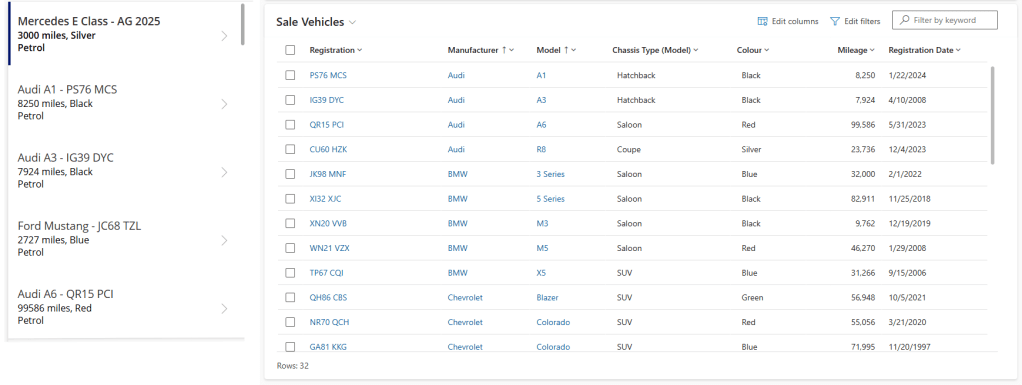
The Gallery is designed to be scrolled by a finger, whereas the View is interacted with by mouse pointer. This brings us to the next point.
Some developers will create canvas apps that are intended to be run in browser rather than on a mobile device. They will shrink the native controls to mouse pointer size; implement bespoke tabbing, pagination, filtering, delegation…etc. This may be necessary – perhaps we are building an app on top of a shared data source that is not Dataverse as described above.
However, if you have no mobile requirements and are using Dataverse, it’s my opinion that you need a good reason not to build a model-driven app.
My general rule of thumb when making the consideration between canvas and model-driven app is as follows – if your users are sitting down at a desk and using a keyboard and mouse, more often than not you need a model-driven app. If your users are on their feet and performing simple tasks, it’s most likely you need a canvas app.
With all of the above in mind, our next post will explore the creation of a Vehicle Servicing canvas app, to be used by the LaRusso Autos mechanics to create a checklist of service inspection checks. See you then!

 Power Platform Pete
Leave a comment